Title here
Summary here
September 2, 2026 in Vim3 minutes
Everyone knows :q by now. The reason people still get stuck is that Vim refuses to quit and the error scrolls past unread.
It is the oldest joke in software, and it is still the single most searched question about this editor.
The answer is :q. But if that were the whole story nobody would still be
stuck, so let us do the version that actually helps.
Vim has modes. If you have been typing text, you are in insert mode, and
:q will not do anything useful because the : just gets typed into your
file.
Press Esc first. Always press Esc first.
If you are unsure what mode you are in, press Esc twice. It is harmless.
| Command | What it does |
|---|---|
:q | quit, if you have no unsaved changes |
:q! | quit and throw away your changes |
:w | save, stay in the file |
:wq | save and quit |
:x | save and quit, but only writes if something changed |
Each needs Enter after it.
There is also a keyboard shortcut version with no colon: ZZ saves and
quits, ZQ quits and discards. Capital Z, twice. Handy once your fingers
know it.
Here is the bit that traps people. You press :q, hit Enter, and nothing
happens. It looks broken. It is not:
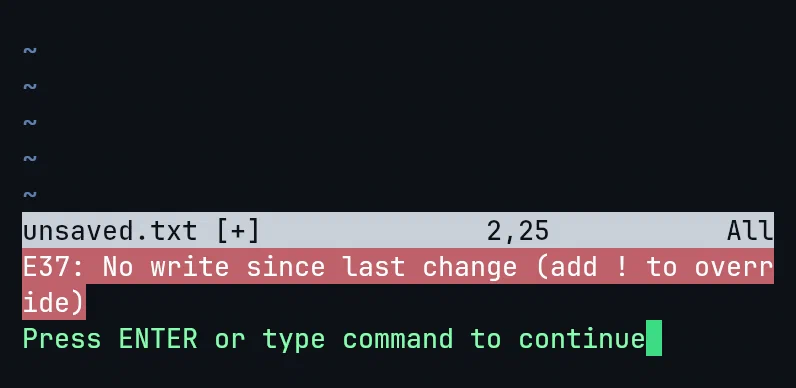
E37: No write since last change (add ! to override)
That is Vim saying: you changed this file and have not saved it, so I am not going to let you lose your work by accident.
You have three choices, and it is worth knowing which one you want:
:wq:q!Esc and keep workingThe exclamation mark means “I know, do it anyway”. That meaning is consistent across Vim, so it is worth internalising early.
If you opened several files, :q closes one window, not the editor. When
another file is still open, it can feel like Vim is refusing to die.
:qa quits all of them. :qa! quits all and discards everything.
Esc, then:wqto save and leave, or:q!to leave and throw it away.
That is genuinely all you need on day one.
The reason this question is a meme is not that Vim is badly designed. It is that Vim is the only common editor that assumes you will learn it, and gives you almost nothing until you do.
That is a real trade. What you get in return is an editor where the effort you put in keeps paying off for the next twenty years, on every machine you ever ssh into, without a mouse.
The exit is the first small tax. Everything after it is the refund.
If you are past the exit and want the rest: Vim & Neovim Mastery, Build a Modern IDE From Scratch starts from a bare terminal and builds up to a full modern setup, with every keystroke on camera.