Title here
Summary here
September 2, 2026 in Vim4 minutes

You undo something, type something else, and the first version is gone forever — except it is not. Here is how to get it back.
Here is a thing that has happened to everyone.
You write a line. You change your mind and undo it. Then you type something different in its place. Ten minutes later you realise the first version was the one you wanted.
So you press u. Then u again. Then Ctrl-r. You go back and forth,
faster and faster, and it is never there. The text is gone.
Except it is not gone. It has been sitting in your editor the whole time.
Most people picture undo as a straight line: a stack of changes you slide up and down. That is true right up until the moment you undo something and then type something new.
At that moment Vim does something quietly clever. It does not throw away the version you undid. It keeps it, and starts a second branch.
Your undo history is a tree.
That matters because u and Ctrl-r only ever walk one branch — the one
you are currently standing on. You can press them all afternoon and you will
only ever see two states, because the version you want is on a limb you
stepped off.
Open any file and try this:
The launch is on Friday.u to undo itThe launch is delayed.Now run :undolist:
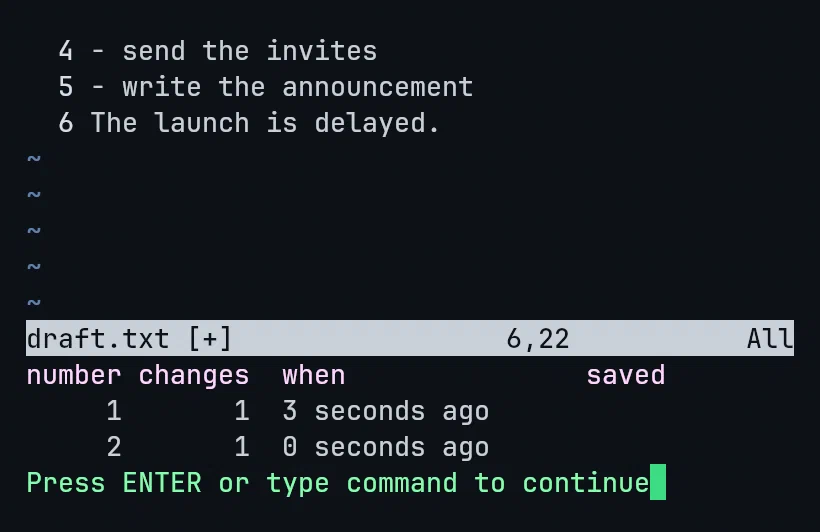
Two branches. Two change numbers. Two timestamps. Vim has been keeping both.
Here is the part that made me sit up the first time I saw it.
g- walks backwards in time. Not backwards along the branch — backwards
through everything that has happened, in the order it happened, branches
included.
Press g- once from that state and there it is:
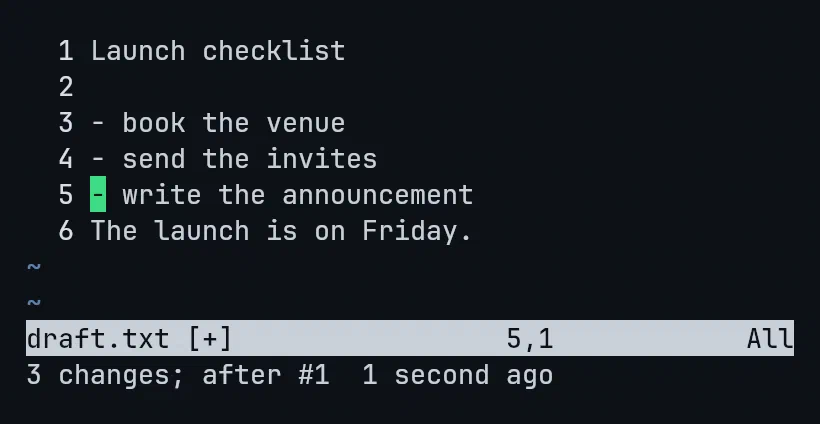
Line 6 is the sentence I “lost”. Vim even tells you where you have landed at
the bottom: 3 changes; after #1.
g+ walks the other way, forward towards the present.
That is the whole trick. Two keys.
Nobody thinks in change numbers. You think in time — “it worked before lunch”, “I broke this twenty minutes ago”.
Vim will take that directly:
:earlier 1m      " the file as it was a minute ago
:later 1m        " roll forward again
:earlier 30s
:earlier 2h
It does not matter how many edits happened in between. And if you want the two ends of the history:
:earlier 999     " as far back as it goes
:later 999 " all the way to the newest stateThere is one catch, and it is a big one: close the file and all of it evaporates. The tree, the timestamps, the branches. Reopen the file and Vim has no memory of any of it.
Unless you tell it to keep them. Two lines in your config:
set undofile
set undodir=~/.vim/undodir
The first tells Vim to write the undo history to disk when you save. The second keeps those history files in one folder instead of scattering them next to your real work.
Vim will not create that folder for you, but you never have to leave the editor to do it:
:!mkdir -p ~/.vim/undodirNow close the file. Quit Vim entirely. Come back tomorrow, open it, press
u — and yesterday’s change undoes.
Most “productivity tips” save you a keystroke. This one saves you the twenty minutes you would have spent rewriting something you already wrote perfectly well the first time.
And it costs two lines of config.
This is one lecture from Vim & Neovim Mastery — Build a Modern IDE From Scratch, where every command is typed on camera in a real terminal — no cuts, no pre-typed config. If this was useful, the course goes considerably deeper.