Title here
Summary here
September 2, 2026 in Vim3 minutes
You do not need a plugin to stop retyping long names. Vim's built-in completion is already on, and most people have never pressed the key.
Almost every “set up Vim properly” guide starts the same way: install a completion engine, wire up a language server, add four plugins to make them talk to each other.
All of that is worth doing eventually. But there is a step before it that nobody mentions, and it costs nothing: Vim already completes your typing. It has since long before most of us started programming. The feature is on right now, in the Vim you already have.
Most people have simply never pressed the key.
Open a file. Start typing a word that already appears somewhere in it, then
press Ctrl-n.
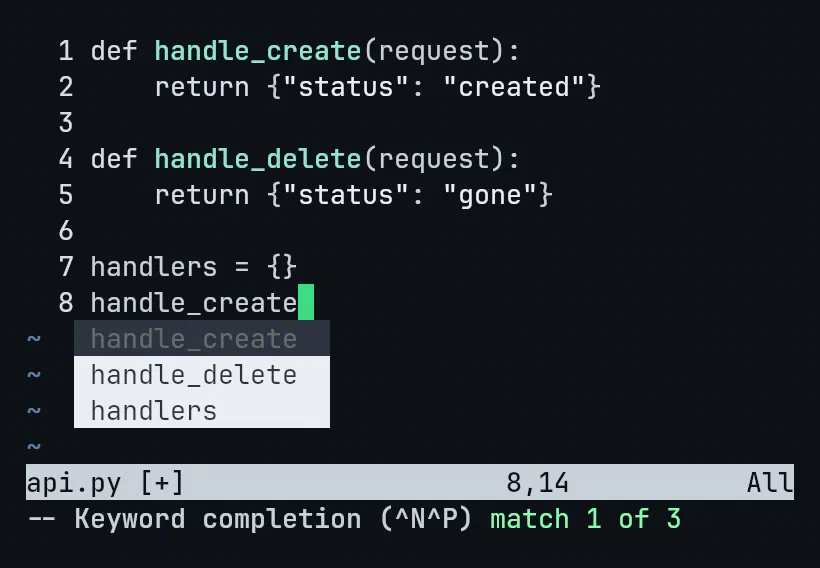
That is a real menu, in plain Vim, listing every word in the file that starts
with what you typed. Look at the bottom: -- Keyword completion (^N^P) match 1 of 3. No plugin. No language server. Nothing installed.
Four keys are worth knowing:
| Key | What it does |
|---|---|
Ctrl-n | next match |
Ctrl-p | previous match |
Ctrl-y | accept it, y for yes |
Ctrl-e | cancel, and give back exactly what you typed |
Ctrl-e is the one that makes this comfortable to use. If the menu offers
nothing useful, one key puts your half-typed word back exactly as it was.
Think about the names in a real file: handle_create, get_by_priority,
ALLOWED_ORIGINS, parse_request_body.
You type each of those once. After that, three or four letters and Ctrl-n
finishes it, spelled correctly, every time. In a file full of long names that
is most of your typing gone, and most of your typos with it.
Ctrl-n pulls from words. Press Ctrl-x first and you get a small submode
with other sources behind it. Two are worth your time.
Ctrl-x Ctrl-f completes file paths. Type ./ and press it, and Vim
reads your actual folders, right then, not from a cached index, and offers
what is really there. Keep going, add a slash, ask again, and it reads the
next folder down.
If you have ever guessed at a filename and been wrong, this is the fix.
Ctrl-x Ctrl-l completes a whole line. Not a word, the entire line,
matched against every line already in the file.
Type the first few characters of a line that exists somewhere above, press
Ctrl-x Ctrl-l, and the whole thing arrives exactly as it was written. For
repetitive blocks, a run of imports, a table of test cases, a series of
similar assignments, this is the one that saves real time.
There is a setting that decides, and it is worth knowing it exists:
:set complete?By default Vim looks in the file you are in, other windows, other buffers you have open, and even buffers you have closed. So a name you typed in a different file twenty minutes ago is still offered to you here.
There is one more door: Ctrl-x Ctrl-o, omni completion. It is
language aware, and in plain Vim it is limited.
It is also exactly the thing a language server replaces properly. When you do eventually install one, you will know precisely what it is upgrading, which makes the whole setup make far more sense.
Install the plugins. They are genuinely better.
But do it knowing what the editor already gave you, because a surprising
amount of the day is covered by four letters and Ctrl-n.
This is one lecture from Vim & Neovim Mastery, Build a Modern IDE From Scratch, where every command is typed on camera in a real terminal. The course builds from plain Vim up to a full modern setup, so you always know what each layer is actually doing.