Title here
Summary here
September 2, 2026 in Vim4 minutes
You know the file is called handlers.py. You have no idea which folder it is in. Vim has had an answer for thirty years, and Vim 9 made it fuzzy.
Here is a problem you hit on day one of any real project.
You know the file is called handlers.py. You have no idea which folder it
lives in. So you start typing :e and then you are guessing. Was it src/?
api/? And when you guess wrong you do not even get an error, you get an
empty buffer with the wrong name, which is worse.
The usual answer is to install a fuzzy finder plugin. That is a fine answer. But there is a much smaller one first, and almost nobody switches it on.
:find handlers.pyE345: Can't find file "handlers.py" in pathFair enough. Vim only looked in the folder you are standing in.
set path+=**path is the list of places :find is allowed to look. ** means every
folder below this one, however deep it goes.
Now the same command:
:find handlers.pyOpens src/api/handlers.py. You never typed a folder name.
It completes, too. Type :find rou and press Tab and Vim finishes it:
routes.py. Add set wildmenu and you get a proper menu of the matches.
That single line in your config quietly changes how you open files.
:find still wants the name roughly right. What you actually want is what
every modern editor calls a fuzzy finder: type a few letters from anywhere in
the path, get the file.
Here is the part most people do not know. Vim 9 added an option called
findfunc, which lets you replace what :find searches with your own
function. Vim also ships matchfuzzy(), which ranks a list of strings against
a pattern.
Put the two together and you have a fuzzy file finder in five lines:
set findfunc=Find
func! Find(arg, _)
  let files = filter(expand("**", 1, 1), "!isdirectory(v:val)")
  return empty(a:arg) ? files : matchfuzzy(files, a:arg)
endfunc
Reading it out loud:
expand("**", 1, 1) walks the whole tree below youfilter(...) throws away the directories, because you cannot open a foldermatchfuzzy and let it rank themSave it, and load it without restarting:
:w | so %Now type four letters that do not sit next to each other in any filename:
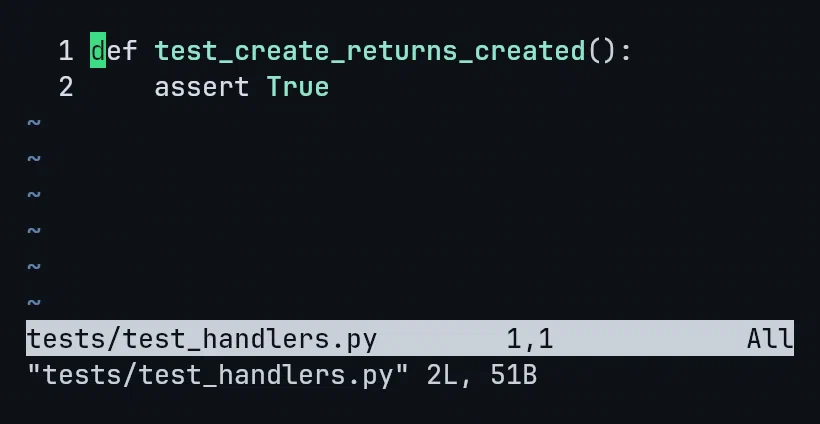
:find thand opened tests/test_handlers.py. The t came from tests, the
hand from handlers, across a folder boundary. Not a prefix. No wildcard.
:find srout lands on src/api/routes.py the same way.
That is a fuzzy file finder, in five lines, with nothing installed. Vim’s own
manual documents the pattern under :h fuzzy-file-picker.
There is an option called wildoptions=fuzzy and it looks like the obvious
thing to reach for. It is not. Vim’s documentation says so plainly:
Currently fuzzy matching based completion is not supported for file and directory names and instead wildcard expansion is used.
So it will not fuzzy match filenames. That is why the recipe above uses
findfunc instead. If you have tried wildoptions=fuzzy and wondered why
nothing felt fuzzy, that is why.
Sometimes you only know something written inside the file:
:vimgrep /handle_create/ **/*.py
:copen
:vimgrep searches the contents of every matching file and fills the quickfix
list. :copen shows it as a list you can walk. :cclose puts it away.
| You want | Use |
|---|---|
| Open a file by name | :find name with path+=** |
| Half remember the name | fuzzy :find via findfunc |
| Switch to something already open | :b fragment |
| Search inside files | :vimgrep then :copen |
Four things, no plugins, and it works on any machine you ssh into.
This is one lecture from Vim & Neovim Mastery, Build a Modern IDE From Scratch, where every command is typed on camera in a real terminal, including this one.