Title here
Summary here
September 2, 2026 in Vim3 minutes
You have a list of two hundred lines and each needs the same small change. Record it once and let Vim do the rest.
You have a list. Every line needs the same small change: wrap it in quotes, add a comma, move a field, strip a prefix.
There are two hundred lines.
You could do it by hand. You could write a script and spend longer on the script than the task. Or you could do it once, carefully, and tell Vim to do the other one hundred and ninety-nine.
Recording a macro is three steps and one key each:
q then a letter — start recording into that letter. qq records
into register q, which is what most people use out of habit.q again — stop recording.Then @q plays it back.
That is the whole feature. The rest is technique.
Say you need every line quoted and comma-separated for a config file:
apple
banana
cherry
Record it once:
qq          start recording into q
I"<Esc>     insert a quote at the start
A",<Esc>    append a quote and a comma at the end
j           move to the next line
q           stop recording
That last j is the important part, and the thing people leave out. The
macro has to leave the cursor ready for the next run. Without it, replaying
just does the same line again.
Now replay it with a count:
5@q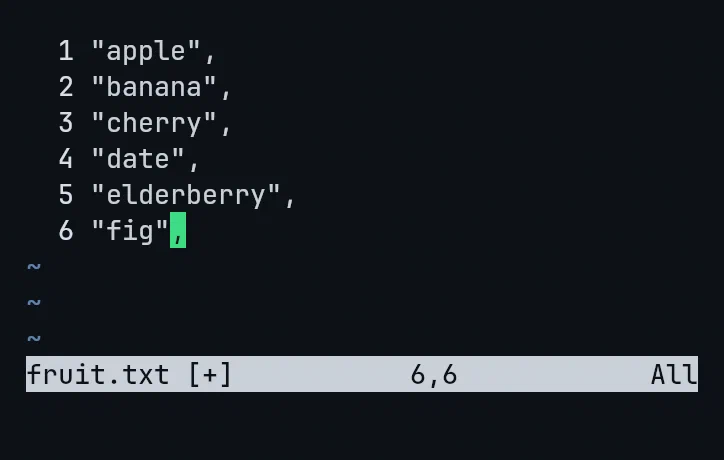
Six lines, one recording, one keystroke.
@@ repeats the last macro you ran. So the rhythm is @q once to check
it did the right thing, then @@ @@ @@ as you watch it work.
A big count is safe. If you are not sure how many lines are left, use a number bigger than you need:
99@qWhen the macro hits the end of the file the j fails, and Vim stops. It does
not wrap around and mangle the top of your file. That means you can be
approximate instead of counting.
The most common macro mistake is recording a fragile edit, one that only works because of where the cursor happened to be.
The fix is the same instinct that makes the dot command useful: prefer edits
that describe themselves. I and A anchor to the start and end of the line,
so they work regardless of your column. f, finds a character rather than
assuming a position.
If your macro works on line two and line seven, it will work on all of them.
Macros are the right tool when the change is the same shape but not the same text. Search and replace handles identical text. Macros handle “take whatever is on this line and rearrange it”.
Converting a list to JSON. Turning log lines into test cases. Adding a parameter to twenty function calls that all look slightly different.
Do it once. Let the editor do it two hundred times.
This is one lecture from Vim & Neovim Mastery, Build a Modern IDE From Scratch, where every command is typed on camera in a real terminal.