Title here
Summary here
September 2, 2026 in Vim2 minutes
The most common Vim frustration has a two-character fix that almost nobody is taught.
This has happened to every single person who uses Vim.
You yank a line, because you want it somewhere else. Then, before you paste it, you delete a different line, because that is how real editing goes. Then you paste.
And you get the deleted line. Not the one you yanked.
Most people shrug, scroll back, and retype it. You do not have to.
Vim has an unnamed register, and it is the one both yank and delete write
into. Your delete simply landed on top of your yank, and p pastes whatever
is in there.
Here is the thing nobody tells you: Vim also kept your yank somewhere safe, and it has been doing that the whole time.
"0pThere it is. Exactly the line you yanked, waiting for you.
Register 0 only ever holds your last yank. Deletes never touch it.
That is the entire rule. Two characters and a p.
Your deletes go into numbered registers, and they shift along as you delete more:
| Register | Holds |
|---|---|
"0 | your last yank |
"1 | the most recent delete |
"2 | the one before that |
| … | … back to "9 |
So "1p gives you back the thing you just deleted, "2p the one before it.
That “wait, I needed that” moment is usually two keystrokes away.
You can look inside at any time:
:regOr narrow it down to the ones that matter:
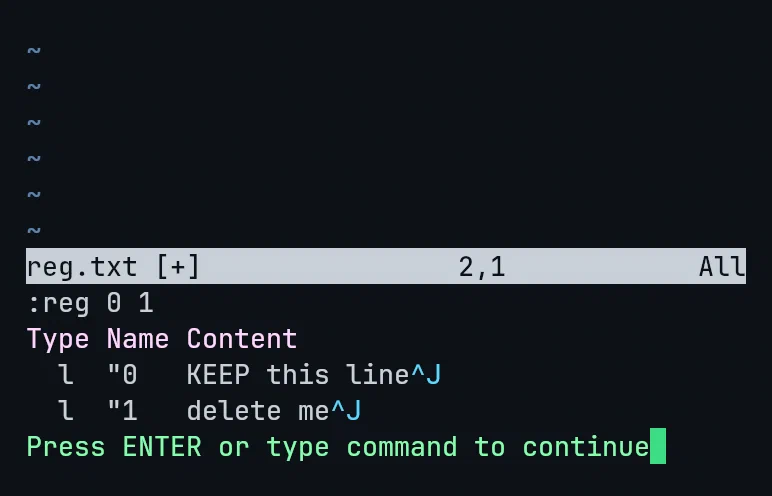
Register 0 has KEEP this line, the text I yanked. Register 1 has
delete me, the text I deleted. Both are sitting there, side by side.
If you know in advance that you want to keep something, put it somewhere with a name. Any letter works:
"ayy      yank this line into register a
"ap       paste register a
Uppercase appends instead of replacing, which is genuinely useful for collecting scattered lines:
"Ayy add this line to register a as wellGather five lines from around a file into a, then paste them all at once.
You do not need to memorise the table. You need one thing:
Paste gave you the wrong text? Try
"0p.
That single habit removes a small, recurring annoyance that most people just live with for years.
This is one lecture from Vim & Neovim Mastery, Build a Modern IDE From Scratch, where every command is typed on camera in a real terminal.