Title here
Summary here
September 2, 2026 in Vim3 minutes
Where the change lands, what it matches, what it becomes, and how it behaves. Four parts, and each one is worth five minutes.
Nearly everyone learns this one line:
:%s/old/new/gAnd then stops. Which is a shame, because that line is four separate ideas bolted together, and each one is independently useful.
Read it as: where / what / becomes / how.
The bit before the s decides where the change lands. % means the whole
file, but it is only one of the options:
| Range | Means |
|---|---|
:s | this line only |
:%s | the whole file |
:10,20s | lines 10 to 20 |
:.,+5s | this line and the next five |
:.,$s | from here to the end |
:'<,'>s | whatever you just selected in visual mode |
That last one is the one to remember. Select a block, type :, and Vim fills
in the range for you. Now your replace is scoped to exactly what you
highlighted, which is far safer than % and a hope.
The most common mistake in the world of find and replace:
:%s/total/subtotal/gThat also matches the total inside subtotals and grand_total. Use word
boundaries:
:%s/\<total\>/subtotal/g\< means “a word starts here” and \> means “a word ends here”. This single
habit prevents most search-and-replace accidents.
A few more pieces worth knowing:
| Pattern | Matches |
|---|---|
\d\+ | one or more digits |
\s* | any amount of whitespace |
^ / $ | start / end of the line |
.\{-} | as few characters as possible |
\c | ignore case, just for this search |
This is where it stops being find-and-replace and starts being a small transformation language.
Wrap part of the pattern in \( and \) and you can reuse it as \1:
:%s/"\(\w\+\)":/"\U\1\E":/gThat says: find a quoted key, and upper-case whatever was inside it.
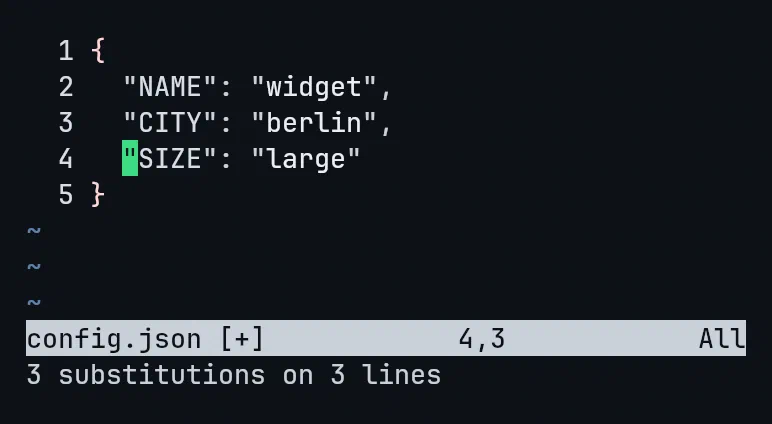
\U upper-cases everything after it, \L lower-cases, and \E ends the
change. & on its own means “the whole match”.
And if you want arithmetic, prefix the replacement with \= and Vim evaluates
it as an expression:
:%s/\d\+/\=submatch(0)*2/gEvery number in the file, doubled.
| Flag | Effect |
|---|---|
g | every match on the line, not just the first |
c | confirm each one before changing it |
i | ignore case for this substitute |
n | count the matches and change nothing |
n is the underrated one. Before running a risky replace, run it with n
first:
:%s/pattern//gnVim reports how many matches there are and touches nothing. If the number surprises you, your pattern is wrong, and you just found out for free.
c is the other safety net. It stops at each match and offers y to change
it, n to skip, a to do the rest, q to stop.
If your pattern is full of slashes, stop escaping them. Any character can be the delimiter:
:%s#/usr/local#/opt#gMuch easier to read than the version with six backslashes in it.
Search first, then substitute:
/\<total\>
:%s//subtotal/g
Leaving the pattern empty in the substitute reuses your last search. So you can search, see every match highlighted, confirm with your own eyes that it matches what you expected, and only then replace.
That ordering has saved me from more bad replaces than any other habit.
This is one lecture from Vim & Neovim Mastery, Build a Modern IDE From Scratch, where every command is typed on camera in a real terminal.